
Design
Design engineering: the path to avoid AI Slop
How to create unique identity instead of another generic AI interface
By Vinícius Amélio

The divergence problem between prototyped and shipped UI
If you've worked in any stage of software development long enough, you probably remember all the changes we've been through in the design-to-code handoff process.
It used to be common to have the entire product prototyped in a tool like Figma, Sketch, or Adobe XD. That's where we defined things like the project's visual identity, components, interactions, user flows, etc. If your project was big enough, you might have had a design system, which made collaboration between designers and developers easier.
But, whether or not a design system existed, something that happened with remarkable ease across projects of every niche, type, and size was divergence. It was very common for some change in the code to never make it back into Figma, because it had been shipped as an emergency fix, or for some change made in Figma to never make it into the code. So the content that was supposed to serve as the source of truth in Figma wasn't actually in sync with what was, in fact, delivered to the end user: the project's real artifact.
LLMs changed a lot about how we write code in 2026, but they also changed how we think about product design and how those concepts get integrated into code.
Why coherence in visual elements and user experience matters
Even if you're an indie hacker doing every stage of building a product yourself, like a lot of us devs end up doing on personal projects, it's still important to keep design and user experience coherent and consistent.
The most effective way to do that, whether you like it or not, is to have a visual source of reference that shows the user flow across the features you ship. It helps keep things coherent and consistent just by glancing at it, but it also makes creating new flows much simpler, because the whole look and feel is already worked out while you build elements inside your design tool.
There's nothing stranger than navigating a product and seeing colors, spacing, fonts, motion, and even copy that don't match. Look, your product isn't just a screen, it's a full experience the user expects.
Even if you've never visited Coca-Cola's website, you can probably picture, at least roughly, what it looks like. When there's no clear standard, that kind of recognition might just never happen with your software.
How AI can help with this
I won't state the obvious here and talk about how an agent can simply generate an entire design system based on your project, integrate it, and even catalog every component in some Storybook or another. No.
Until recently we didn't have many Vibe Design tools (something close to vibe coding, but for design), or at least not many popular ones. So it was much more common to run into designers who started using agents to skip the prototyping stage in some Figma or another and go straight to code.
And while that gets fast results, it runs into problems like: if I want to see an experience, I need to run the project, I need to set up mocked scenarios to see edge cases, I need a whole backend and infra setup on a designer's machine just so they can work.
Right now, as I write this post, there are a few tools trying to solve that, including Figma itself, by connecting agents that can read and write elements on the canvas and mirror elements and experiences between the design project and the code. That's fascinating.
I've been using Paper a lot over the past few weeks to build new flows for Physikos, and it's been a great experience, especially because I already had all the main flows drawn out in Figma (that's how I always start new projects). Paper is also compatible with Figma, so I have access to pretty much every element from Figma inside Paper too.
There are a few other tools doing the same thing, like Pencil and Wonder, which I've been following since their betas. Essentially, they all do the same thing:
- You build the UI on frames, or use prompts to automate creating those elements and screens
- You sync the code with the design
- You finally keep a real source of truth
Put that way it sounds simple, but in practice, I have access to variables and tokens right inside the design tool: I can just change a value in one place and have it reflected in my code, with zero friction, zero stress. You can even use image-generation MCPs and create your own assets straight from the same canvas.
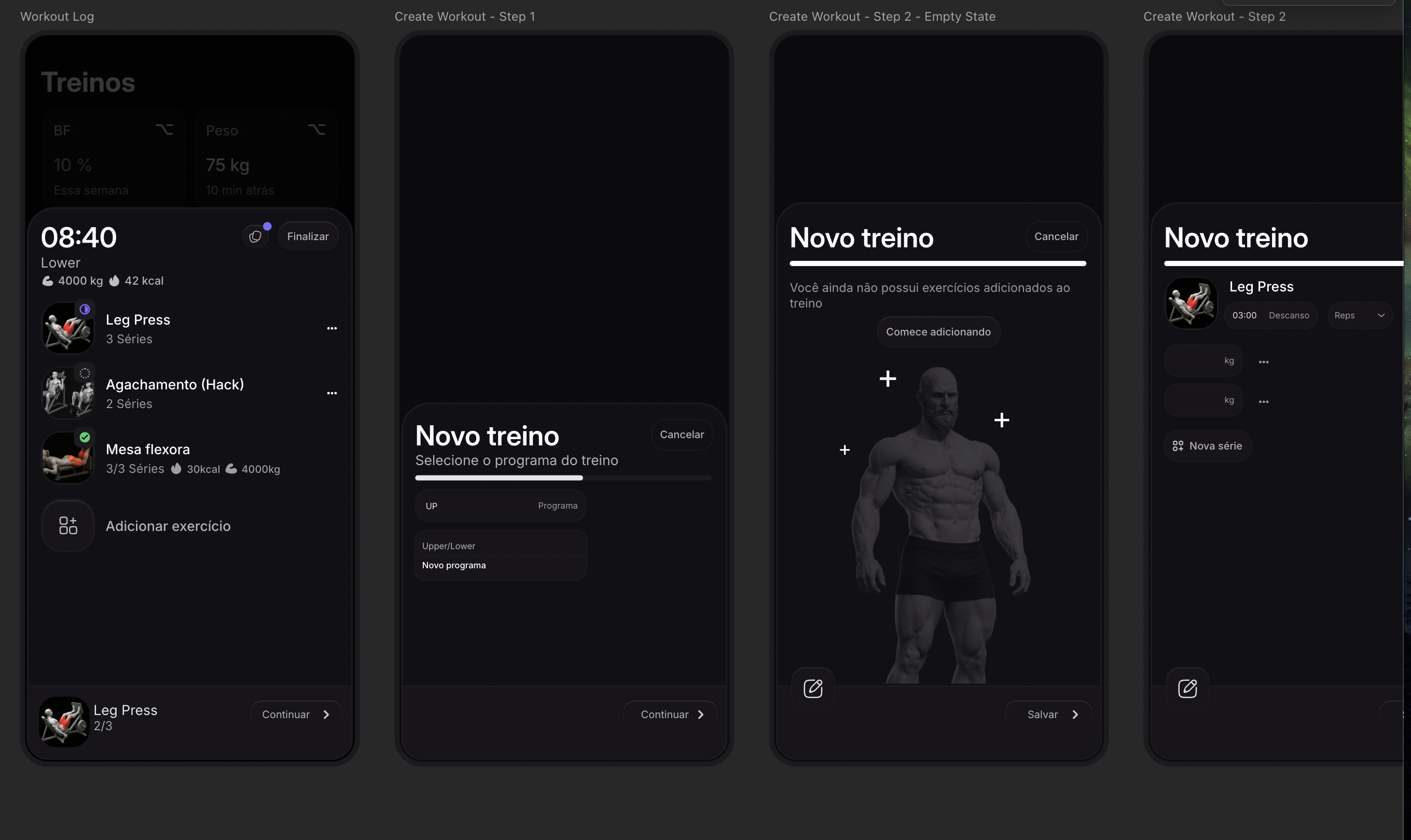
Honestly, this has worked out so well that big companies have started creating roles called "Design Engineer" to work this way.
Think of these people as front-end devs with UI/UX knowledge, or designers with front-end knowledge. It's the kind of professional who crosses knowledge boundaries to build the best possible experience for users.
Design engineering: a natural path for indie hackers?
It's no surprise that more and more tech people are deciding to go fully solo, launching their own products with a lot of help from agents. It's also no surprise that terms like "AI Slop" have shown up, given certain patterns LLMs default to when generating generic interfaces: gradients, rounded corners, cards stacked on cards, etc.
The biggest risk for an indie hacker jumping straight to code with an agent is ending up with exactly the same pattern everyone else ends up with: the same purple gradient, the same soft-shadow cards, the same font (usually some variation of Inter), the same hero promising "ship faster with AI." That's not design, that's the statistical average of thousands of landing pages the model saw during training. And if your product looks like everyone else's, the only thing left to set you apart is price, and price is the worst place to compete when you're a solo indie hacker up against companies with deep pockets and a whole growth team.
This is exactly where the prototype-first approach stops being just a matter of organization and becomes a real competitive edge. When you design first, deciding on palette, typography, spacing, copy tone, motion, before writing a single line of code, you're making identity decisions. The agent stops being the one deciding what your interface looks like and becomes the one executing a decision you already made. It's the difference between asking for "a nice-looking landing page" and asking to "implement this frame, with these tokens, this copy, this motion," which is exactly the difference I felt working on Physikos with Paper.
Notice: the problem was never using AI. The problem is outsourcing your aesthetic judgment to AI, the same point I made in an earlier post about software architecture. A design system that's actually yours, built from your own decisions, synced with the code through tools like Paper, Pencil, or Wonder, makes sure the agent works inside a system with identity, instead of building one from scratch based on whatever's statistically most likely to please.
For anyone building solo, this matters even more. You don't have a design team to push back on decisions and fight the "AI Slop" trend just because it exists. The only real barrier between your product and one more generic clone racing to the bottom on price is the discipline to prototype before you code. Yes, that's more work upfront. But that work, that intentional visual source of truth you build, is exactly what keeps a product from becoming a commodity.